By Michael Smith (Knolly Boy 2K), owner and lead engineer
If you searched for an online recording studio, this page explains how a remote session with Blak Marigold Studio actually works. You do not have to be in the same room as the engineer. We work from 14321 James Buchanan Street in Manor, Texas, just east of Austin, and we connect with artists through Muse, a desktop app built for real-time music collaboration.
A remote recording studio session is a live working session. You can hear the track, talk through takes, and record while you stay in your own space. That is different from only sending files in after the fact, though we also mix and master songs that way.
Ready to send a finished song in for a professional mix?
Send your stems for mixing and mastering

What an Online Recording Studio Session Is
An online recording studio, also called a remote recording studio, lets an artist, producer, or voice actor work with an engineer over the internet instead of traveling to the room.
At Blak Marigold Studio, that usually means:
- You are at home, in another studio, or on the road
- I am in our Manor studio, just east of Austin
- We meet in Muse, not in a generic video call built only for talking
- You can share a microphone, an instrument, or audio from your DAW
- I can share the session audio so you can hear the mix and record with it
- Takes can be recorded into a DAW during the session
This is the remote recording service already offered on this page. It is a live session with an engineer, powered by Muse, for artists and voice actors who need to work without making the trip.
Google rates the studio 4.9 from 202 reviews. Records mixed and mastered here have surpassed 1.4 billion streams on Muso.ai. Those numbers do not replace a good take, but they are the public facts behind the room you are connecting to.
How a Remote Session with Blak Marigold Works
Here is the working path we use.
Tell us about the song and the date
Share what you want to record, the DAW you use, and the gear you have. For a remote Muse session quote, email Blakmarigold@gmail.com, call 512-593-1267, or use our contact page. If your tracks are already recorded and you only need mixing and mastering, you can go straight to the mixing and mastering page.
Download the Muse desktop app
Muse is made by Muse App Inc. The official site is Muse. The app is available for macOS and Windows. Muse says it is not offered as a full mobile app. You can join a session as a guest from some mobile browsers for a listening session, with limited features, but a recording session should be done from a computer.
Join the session we host
Once Muse is installed, you join the session from the app. Muse's current plan page says that when the host has a Pro plan, everyone who joins that session gets the same access, and only people who want to host their own Pro sessions need a paid plan of their own. If we host, you should not need to buy Muse just to join. Confirm that with us before the date so you are not surprised.
Share your sound and hear the session
In Muse you can share a microphone, an instrument, or a MIDI device, then mute, solo, and adjust each audio stream. Muse also lets you stream audio from your computer or your DAW so the other person can hear what you are playing. Plugins are available as VST3, AU, and AAX, which means DAW audio can be shared, or audio from a collaborator can be recorded into a DAW.
Record the takes
Muse documents two recording paths. You can use the Muse Recording plugin, or select the Muse Recording device as an input. That works on Windows and Mac, and Muse specifically mentions workflows for Pro Tools and Ableton. You can record into your DAW or into the engineer's session, depending on how the session is set up.
Share files and, if needed, a screen
Files can be dragged into Muse's chat and dragged back out into a DAW. If you need help with a setting, Muse lets a collaborator share a screen and request control, which the other person has to approve.
Listen as you go
You can monitor the session in real time through Muse, including a signal from the master bus as a plugin. That live monitoring is one of the reasons this is a session, not just a file handoff.

Muse's own FAQ is honest about limits, and we should be too. Playing in perfect sync over the internet, the way a band locks in the same room, depends on each person's internet and computer, and Muse says that kind of live jam can be difficult. A typical vocal, voiceover, or overdub session is the better fit. Wear headphones. Muse's support page says speakers in the same room as the microphone are a common cause of echo.
What Muse Does in the Session
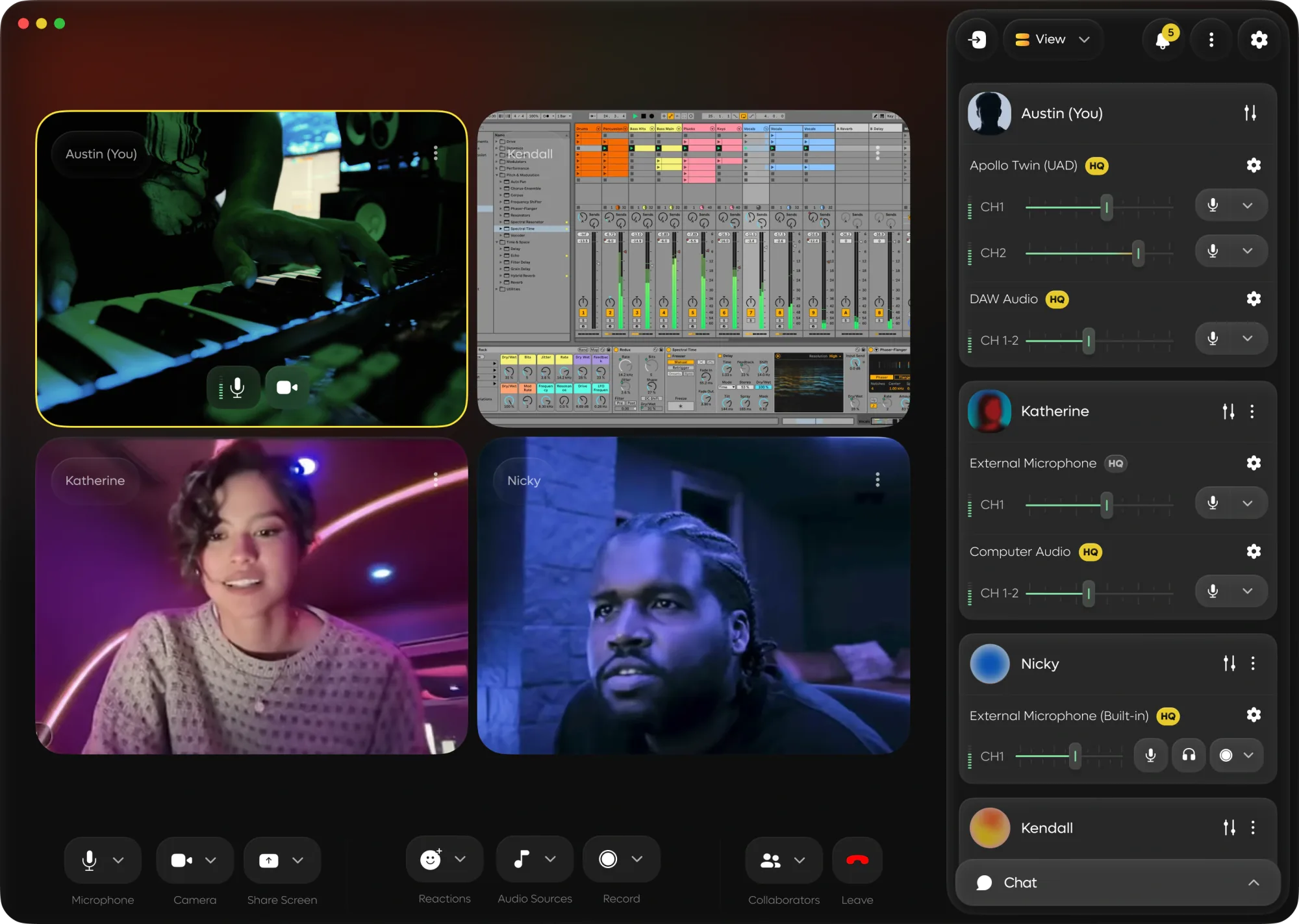
Image from the official Muse website. Muse is a product of Muse App Inc.
Muse describes itself as a virtual studio for musicians, producers, and engineers. The features that matter in our sessions, taken from the official Muse site and FAQ as of November 10, 2026, America/Chicago, are:
- Real-time collaboration in one desktop app, used with the DAW you already have
- Sharing of microphones, instruments, and MIDI devices
- High-quality audio streaming from a DAW, a file, or the computer
- Muse plugins in VST3, AU, and AAX formats
- Recording into a DAW with the Muse Recording plugin or the Muse Recording device
- Drag-and-drop file sharing in chat
- Screen sharing and screen control, if you grant access
- Desktop apps for macOS 12 or newer, older Mac versions, and Windows 10 or newer, currently listed as Muse version 3.1.8
We use Muse because it is built for music work. It is not just a talking app with a file attached later. Download it from the official Muse site when you are preparing for a session with us.
What You Need Before You Connect
You do not need a commercial studio on your side. You do need a setup that can send a clean signal.
- A computer that can run a DAW and the Muse desktop app
- A microphone, an audio interface, and headphones
- A stable internet connection
- A DAW you already know, or one we help you get running
If you do not already have a DAW, we can point you to REAPER from Cockos, which you can download and evaluate at no cost. We will help you get through setup before the session so the working time is spent recording, not hunting drivers.
Keep the room as quiet as you can. A decent microphone, soft surroundings, and headphones will do more for the recording than a long list of plugins.
Recording from Anywhere with an Austin Area Studio
Blak Marigold Studio is a physical room in Manor, just east of Austin, not only a website. Some artists come in for studio recording. If you come in for an in-person session, studio time is $75 for 1 hour only, $50 an hour for 2 hours or more, and $100 an hour with mix and master. Remote Muse sessions are priced by custom quote, not at those studio-time rates.
You are not being passed to a random operator. You are working with me, Michael Smith (Knolly Boy 2K), in a studio at 14321 James Buchanan Street. If you later want to finish in person, you can read more about our studio in the Austin area.
We also use this workflow for voice actors who need to work on projects outside Texas. We have a voiceover and dubbing page for that work.

A Session That Brought an Engineer and an Artist Together
William Bowser, a mixing and mastering engineer from DC, introduced Muse to our studio. He needed a professional setup to work with an artist from Tennessee who had flown to Austin to collaborate with us. Muse made it possible to connect that session in one place, with the engineer, the artist, and our room working together.
Mixing and Mastering After You Record
A remote tracking session and a mix are not automatically the same purchase. If you already have the song recorded, or you finish tracking and want the record mixed and mastered, you can send the files in.
Send-in mix and master is $200. Mastering only is $75. Delivery is 3 to 5 days, with two revisions. If you need help exporting the files, use our guide to exporting stems for mixing.
View mixing and mastering services
For a remote Muse session quote, email Blakmarigold@gmail.com or call 512-593-1267. Those quotes are separate from in-person studio time and from send-in mixing and mastering.
Frequently Asked Questions
What is an online recording studio?
An online recording studio is a way to work with an engineer over the internet instead of being in the same room. At Blak Marigold Studio, that means a live remote session in Muse, where you can hear the track, talk through takes, and record from your own space while we work from our studio in Manor, just east of Austin.
How does a remote recording studio session with Blak Marigold work?
You download the Muse desktop app from the official Muse site, join a session we host, and share your microphone, instrument, or DAW audio. We share the session sound so you can monitor in real time. Takes can be recorded into a DAW with Muse's recording plugin or recording device, and files can be exchanged in Muse's chat.
What do I need for a remote recording session?
You need a computer that can run a DAW and the Muse desktop app, a microphone, an audio interface, headphones, and a stable internet connection. A quiet room helps. If you do not already have a DAW, we can point you to REAPER, which you can download and evaluate at no cost, and help you get set up before the session.
Can I record vocals remotely with Blak Marigold Studio?
Yes. Many remote sessions are vocal overdubs. You record from your own microphone and room, while monitoring the session in Muse. We can also work with voice actors who need to record remotely. The quality still depends on your room, your mic, and a clean signal into your interface.
Can I work with Blak Marigold engineers from outside Austin?
Yes. The studio is in Manor, just east of Austin, and we work with artists who connect from other cities and from other countries. You can also come in person for a studio session if you are in the area.
How much does a remote recording session cost?
Remote Muse sessions are priced by custom quote. Email Blakmarigold@gmail.com or call 512-593-1267 for a quote. In-person studio time is $75 for 1 hour only, $50 an hour for 2 hours or more, and $100 an hour with mix and master. Those studio-time rates do not apply to remote Muse sessions. If you are sending a finished song in for mix and master, that service is $200, or $75 for mastering only, delivered in 3 to 5 days with two revisions.
Can I mix and master a song without coming into the studio?
Yes. You can send your tracks for mixing and mastering without a live remote session. Use WAV stems that all start at the same point, and include a rough mix. Our stem export guide walks through the steps in common DAWs. Send-in mix and master is $200, or $75 for mastering only, with two revisions and delivery in 3 to 5 days.
Do you offer live monitoring during a remote session?
Yes. You can monitor the session in real time through Muse, including the signal from the master bus as a plugin, so you can hear the track while you record and talk through takes with the engineer.
Ready to Work on Your Song
If you want to record from your own space with an engineer in the Austin area, email Blakmarigold@gmail.com or call 512-593-1267 for a remote session quote, or use our contact page. If the tracks are already done and you need the mix, send them through our mixing and mastering page.