

Why Your Song Sounds Quiet on Spotify After Mastering
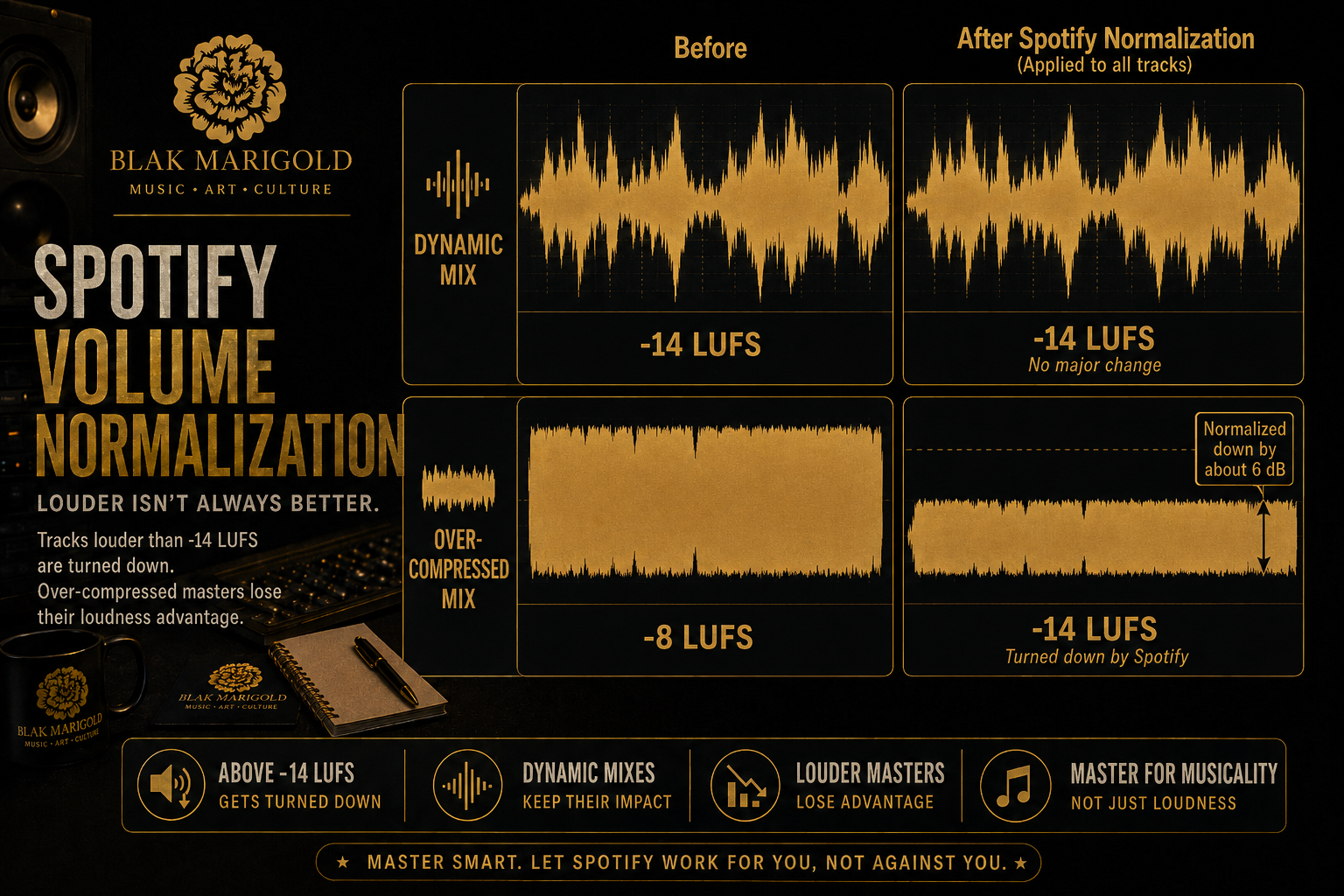
Table of Contents
• Why a song can sound quiet even after mastering
• What Spotify loudness normalization actually does
• The real reasons songs feel small on streaming
• Loudness versus punch versus clarity
• How to tell whether the problem is the mix or the master
• A practical fix checklist before you upload
• What artists get wrong when chasing louder masters
• When to hire a mix engineer or mastering engineer
• Why this matters for sync placements too
• Final takeaway
• FAQs
Why a Song Can Sound Quiet Even After Mastering
A lot of artists assume their song sounding quiet on Spotify means the mastering engineer did not make it loud enough. This is a huge oversimplification of what Spotify does, and the role mastering plays in it. The bigger issue is that artists use the word loud to describe several different problems at once. Sometimes they mean the track is literally lower in playback level. Sometimes they mean that it feels smaller than commercial songs. Sometimes they mean the low end disappeared, the chorus does not lift, or the song lost its impact when it landed in a playlist next to other songs.
Spotify does not simply reward the loudest file.Spotify states that it applies loudness normalization during playback and adjusts tracks to a target playback loudness of -14dB LUFS using the ITU 1770 standard. Spotify also explains that a more dynamic track mastered around -14dB LUFS can keep its peaks intact, while a very loud track such as -6dB LUFS gets turned down during playback. In other words, louder masters do not automatically win on Spotify. They just get reduced. This is why a track can be aggressively limited and still feel underwhelming when it hits streaming.
The real question is not, ‘How do I make my song louder on Spotify?’ The real question is, ‘Why does my song feel smaller, quieter, or less exciting than other songs after normalization?’ That is a mix translation question, an arrangement question, and a low-end management question. If you solve the actual reason the record feels weak, you usually get a better result than simply driving the limiter harder.
What Spotify Loudness Normalization Actually Does
Spotify tells us loudness normalization is applied during playback, not baked into your uploaded audio file. It is adjusting playback so listeners get a more consistent experience when tracks from different projects, genres, and eras are played back to back.
Spotify’s own documentation also explains why some songs still feel quieter than others. If a track is highly dynamic and mastered around -14dB LUFS, its peaks remain intact. If another track is smashed much hotter, Spotify may turn it down to the same perceived playback range. Both tracks can end up in a similar loudness zone, but they will not feel the same. One may feel punchier because of strong transients and better contrast. Another may feel flatter because it was over-limited before upload.
That is the part artists miss. Loudness normalization does not magically make every song equally exciting. It only narrows playback loudness. It alone can’t correct muddy low mids, harsh upper mids, weak vocal balance, inconsistent bass, or a chorus that was arranged too thin. So when a song sounds quiet on Spotify, the issue may be less about the final LUFS number, and more about how the mix carries energy once the platform levels the playing field.
The Real Reasons Songs Feel Small on Streaming
The first common reason is a weak mix balance. If the vocal sits too low, the snare is soft, the kick is masking the bass, or the instrumental eats the center image, the song will feel smaller after upload even if the master is technically loud enough. Streaming reveals balance problems quickly because the playback environment is unpredictable. The record has to hold up on phones, cars, Bluetooth speakers, earbuds, and playlists. A master can only do so much if the mix never carried authority to begin with.
The second reason is poor low-end translation. This shows up all the time in independent releases. The bass feels huge in the studio, but on streaming it becomes cloudy, inconsistent, or missing. When the low end is uncontrolled, the limiter responds to energy that listeners may not even hear clearly on smaller systems. The track loses usable headroom, the top end feels less open, and the song can end up feeling smaller even though the meter suggests it is loud. This is one reason experienced mix engineers spend so much time making the low end stable before mastering even begins.
The third reason is over-limiting. Artists often push the master too far because they are comparing unnormalized references in the DAW instead of real-world playback. Once the limiter starts flattening transients and shaving movement off the mix, the track may read loud but feel lifeless. Spotify’s documentation and Apple’s mastering guidance both point to the same reality: platform targets are useful context, but forcing every song toward an arbitrary number can damage the musical result. Logic Pro’s own Mastering Assistant documentation says that while -14 LUFS integrated is common for many streaming platforms, engineers do not always aim strictly for that value because the right loudness depends on the mix itself. For example, many Pop and EDM tracks will hit closer to -9LUFs, if not louder.
The fourth reason is arrangement density. A song with no contrast between verse and chorus can feel quiet even when the playback level is fine. Why? Because our ears react to movement, impact, and emotional lift, not just RMS or LUFS. If every section is pinned and busy, there is nowhere for the hook to feel bigger. That makes the song feel smaller in playlists next to records with better dynamics and section design.
The fifth reason is bad referencing, or even not using referencing at all. Artists compare their song against commercially released tracks without level-matching. That is a guaranteed way to make the wrong decisions. A hotter reference will almost always seem better for a moment. But once both songs are heard under normalized playback, the better-balanced mix often wins. This is why reference workflow matters so much before release.
Need help before you upload? If your song sounds smaller on streaming than it did in the session, this is usually a mix, master, or translation problem—not just a loudness number. Send it to Blak Marigold Mixing & Mastering for a release-ready mix and master that holds up on Spotify, Apple Music, cars, earbuds, and playlists.
Loudness Versus Punch Versus Clarity
Artists often talk about loudness like it is one thing. In reality, there are at least three different elements to it: playback loudness, punch, and clarity. Playback loudness is the normalized level people hear on the platform. Punch is the sensation of impact created by transient shape, contrast, and low-end control. Clarity is the way vocals, drums, and key musical elements remain intelligible and emotionally forward. You can increase one while damaging the others if you are not careful.
A song that is technically louder can feel weaker if the kick lost its transient, the snare stopped cracking, or the vocal got buried in upper-mid harshness. Likewise, a song with controlled dynamics and excellent balance can feel bigger than a more limited track because the important elements survive playback better. This is why commercial masters are not just loud. They are organized. Their low end is disciplined. Their vocal is anchored. Their top end is exciting without becoming brittle. Their arrangement leaves room for energy to expand when the chorus arrives.
That is also why artists should stop asking only, “How many LUFS should I master for Spotify?” A better question is, “Does this mix still feel clear, competitive, and emotional when the platform normalizes playback?” If the answer is no, the fix is usually upstream in the mix or production decisions, not just the final limiter settings, and definitely not when Spotify applies that final Normalization.
How to Tell Whether the Problem Is the Mix or the Master
Start with the vocal. If the lead vocal disappears in the chorus, sounds dull next to commercial releases, or changes level unpredictably, you likely have a mix issue. A mastering engineer can shape overall tone and level, but mastering cannot rescue a lead vocal that was never controlled properly in the mix.
Next, listen to the low end. If the kick and bass fight each other, the sub blooms on one speaker but vanishes on another, or the track seems to trigger the limiter too aggressively, that is usually a mix issue. The low end has to be stable before the master can sound expensive.
Then, adjust the transient information. If the drums feel flat, the choruses do not open up, and the master sounds louder but smaller at the same time, the limiter chain may be too aggressive. That points more toward a mastering problem, if not a mix that was already too crowded before mastering started.
Finally, compare your mix and master at matched levels. Pull the reference down so you are not fooled by volume. If the reference still feels wider, clearer, more emotional, and more controlled, the answer is not simply to add more limiter. The answer is to figure out which elements in your record are not translating with the same authority.
A Practical Fix Checklist Before You Upload
Before you release the song, run through this checklist. This is the kind of workflow that prevents artists from chasing the wrong fix after the song is already live.
• Check your mix against two or three level-matched references in the same lane as your record.
• Make sure the lead vocal stays emotionally forward in the busiest section of the song.
• Listen to the low end on speakers, headphones, and a small playback system.
• Check whether the chorus actually feels bigger than the verse without relying only on limiter gain.
• Listen for harshness around the upper mids that can make a track feel tiring instead of expensive.
• Confirm your limiter is not flattening the punch out of the drums.
• Export the highest-quality master your distributor accepts rather than guessing at a streaming-specific downsample too early.
• Test the song on Spotify after a private or test upload if possible, then compare it to real-world references instead of only listening inside the DAW.
• If you plan to pitch for sync, also prepare instrumental, clean, and alternate versions so the release master and sync assets stay consistent.
This checklist matters because artists often discover the problem too late. They upload, hear the issue on streaming, panic, and then try to fix it with a rushed remaster. But if the mix is the problem, a remaster alone will not solve the real translation issue. That is why quality control before release matters so much.
What Artists Get Wrong When Chasing Louder Masters
The biggest mistake people make when mastering is only using their eyes, and not their ears. Artists watch LUFS meters, waveforms, and plugin marketing more than they listen to translation. Metering matters, but a screenshot cannot tell you whether the vocal cuts, whether the low end folds up in the car, or whether the chorus still lifts emotionally when normalized.
The second mistake is assuming the loudest rough always wins. Roughs often feel exciting because they are clipped, hyped, or simply more familiar. But familiar is not the same as finished. Many artists get attached to distortion, over-compression, or harsh top end because they heard that version 200 times. A real mix and master process is partly about preserving the energy of the rough while removing the weaknesses that will hurt the song in the real world.
The third mistake is treating mastering like a repair shop for arrangement and recording problems. If the vocal was recorded inconsistently, the beat is already over-compressed, the instrumental file is low quality, or the low mids are packed with mud, mastering can only do so much. The song has to be built to survive mastering.
The fourth mistake is ignoring platform context. Spotify is not the only destination. Apple Music, YouTube, TikTok edits, DJ play, direct-to-fan playback, and sync uses all put different pressure on the record. A strong mix/master workflow is about creating a record that translates broadly, not gaming one platform for one number.
When to Hire a Mix Engineer or Mastering Engineer
Hire a mix engineer when the song itself still feels messy, crowded, inconsistent, or emotionally flat. That includes vocals not sitting right, drums not hitting the way they should, or production layers fighting each other. Hire a mastering engineer when the mix already feels strong and you need final translation, polish, sequencing, loudness decisions, and quality control before release.
If you are unsure, the easiest test is this: if you keep reaching for broad fixes to solve specific element problems, you probably need mix work. If the song already feels right but needs final glue and release-readiness, you probably need mastering. A lot of independent artists actually need both, especially if they recorded in multiple rooms, used internet beats, or assembled a project from files created in different sessions.
As a general rule of thumb, many artists, even those who mix their own music, will often send their work off to a professional engineer for mastering. This is a common part of the pipeline for two reasons: 1: More ears on a project means the final track will translate better to more people. 2:Mastering helps a great mix shine by making sure it translates well on multiple sound systems, speaker setups, and audio quality levels, as well as matching energies with other similar tracks or albums.
For artists trying to grow beyond hobby releases, this matters because your streaming profile trains listeners how to perceive your music. If the sonics are inconsistent from song to song, people notice. Playlists notice. Supervisors notice. Collaborative partners notice. The quality bar is not about perfectionism. It is about credibility.
Want a stronger release and better sync readiness? Book your next record through Blak Marigold Studio, explore Mixing & Mastering, or visit the Sync page if you need help with instrumentals, clean versions, and placement-ready delivery.
Why This Matters for Sync Placements Too
If your goal is not just streaming but sync licensing, then playback issues on Spotify are often warning signs for bigger problems. Supervisors, editors, and music teams need tracks that translate immediately. If the vocal is unclear, the low end is unstable, or the master feels crushed and small, your song is harder to place. Sync-ready music is not only about metadata and ownership. It is also about sonic reliability.
Your own sync content already points in this direction. Blak Marigold’s sync page and sync-focused blog posts emphasize clean edits, instrumentals, and professional finishing. That is the right angle because music supervisors do not want to chase missing versions or hear records that sound unfinished next to commercial material. A strong mix and master does not guarantee a placement, but weak translation can absolutely remove a song from contention.
That makes this blog valuable for two audiences at once: artists who want stronger releases and artists who want sync opportunities. Both groups need the same core truth. Good loudness strategy starts with a mix that translates.
Final Takeaway
If your song sounds quiet on Spotify after mastering, do not assume the fix is simply making it louder. Spotify already tells us that playback loudness is normalized and that hot masters can be turned down. The better move is to ask why the track feels smaller after that normalization happens. Most of the time, the answer lives in mix balance, low-end control, dynamics, arrangement, or over-limiting. Fix those issues, and your song stands a much better chance of feeling competitive on streaming, in playlists, and in sync-ready conversations.
The artists who win long term are not the ones who chase the most aggressive meter reading. They are the ones who deliver records that feel clear, expensive, emotional, and consistent across playback systems. That is the bar your blog should speak to, and it is the exact point where a strong mixing and mastering service becomes the natural next step.
FAQs
-
Because Spotify applies loudness normalization during playback, and because your mix may have translation issues that become more obvious once platform playback levels are evened out.
-
Yes. Spotify says very loud masters can be reduced during playback so tracks sit closer to its playback target, which means a louder file does not automatically sound bigger on the platform.
-
Not blindly. Negative 14 LUFS is useful context, but the better goal is a master that translates well after normalization. Some songs need more or less density depending on the material.
-
Yes. A song can meter loud but still feel small if the transient impact, vocal presence, clarity, or low-end control are weak.
-
It depends, but many quiet-feeling songs are really suffering from mix issues such as muddy low mids, unstable bass, weak vocal balance, or crowded arrangements.
-
No. Spotify says lossless playback affects quality, not loudness, and normalization still applies.
-
Because strong commercial records usually have better arrangement, balance, low-end control, vocal presentation, and translation before the final master is ever printed.
-
Only to a limited degree. Mastering is broad-stroke processing. If a specific element is wrong, the mix normally needs to be addressed first.
-
Level-match the reference and your track before comparing. If you compare them at different playback levels, the louder one will almost always seem better.
-
Absolutely. If your track feels small, muddy, or inconsistent on streaming, those same issues can make it harder for supervisors and editors to trust the song in a professional placement context.
-
When you keep fighting translation issues, second-guessing loudness decisions, or hearing your song fall apart across different playback systems and release platforms.
-
Send the cleanest possible files, consolidated audio if needed, your rough mix, clear notes about the sound you want, and references that match the lane you are aiming for.
