Hip-hop mixing and mastering in Austin with clear rates and a 3 to 5 day turnaround
You bounce the mix at 2 a.m., run it back in your headphones, and it slaps. The 808 is warm, the hats sparkle, the vocal sits right on top. Next morning you play it in the car and everything falls apart. The bass swallows the hook, the vocal sounds like it moved to the back seat, and the kick just disappears.
You are not crazy, and your car is not broken. This is called a mix translation problem, and it is one of the most common issues we hear about from artists. The good news is that it can be diagnosed and fixed. This guide walks through exactly why your mix sounds bad in the car, how headphones hide the problems, and the specific moves that make a hip-hop or trap record hit on every system.
“Headphones tell you what your mix could be. The car tells you what it actually is.”
What This Guide Covers
Why Your Mix Sounds Different in the Car
Why Headphones Can Hide Mixing Problems
Seven Reasons Your Mix Sounds Bad in the Car
Why Vocals Disappear Behind Your 808
How to Fix Muddy Bass and Weak Kicks
How Stereo Width and Phase Affect Playback
How to Test Your Mix on Different Speakers
How to Use Reference Tracks Properly
Why Loudness Is Not the Fix
Five Common Mixing Mistakes to Avoid
When Mastering Can Help and When You Need a New Mix
How Blak Marigold Studio Handles Mix Translation
Final Mix Translation Checklist
Frequently Asked Questions
Why Your Mix Sounds Different in the Car
A car is a tiny, sealed room full of glass, plastic, and seats, and that changes how bass behaves. Three things are happening at once.
Cabin gain builds up the low end
In a small sealed space, the lowest frequencies get a natural boost. Engineers call this cabin gain. Depending on the car, sub-bass in roughly the 30 to 80 Hz range can come out noticeably louder than it does on headphones. If your 808 already felt big in your cans, the car can push it right over the edge and bury everything else.
Speaker placement is far from ideal
In a studio, the monitors and your head form a triangle. In a car, you sit off to one side, the door speakers are near your knees, the tweeters may be on the dash, and the subwoofer might be in the trunk. The left and right speakers arrive at your ears at different times and levels, so the stereo image shifts and some frequencies cancel each other out.
Road noise masks the quiet stuff
Tire and engine noise sit mostly in the low and low-mid range. That rumble covers up quiet details such as ad-libs, reverb tails, and the body of a soft vocal. Anything in your mix that depends on a quiet room to be heard is in trouble the moment you hit the highway.
Why Headphones Can Hide Mixing Problems
Headphones are a great tool for detail work, but they lie in a few predictable ways.
Every pair has its own frequency response
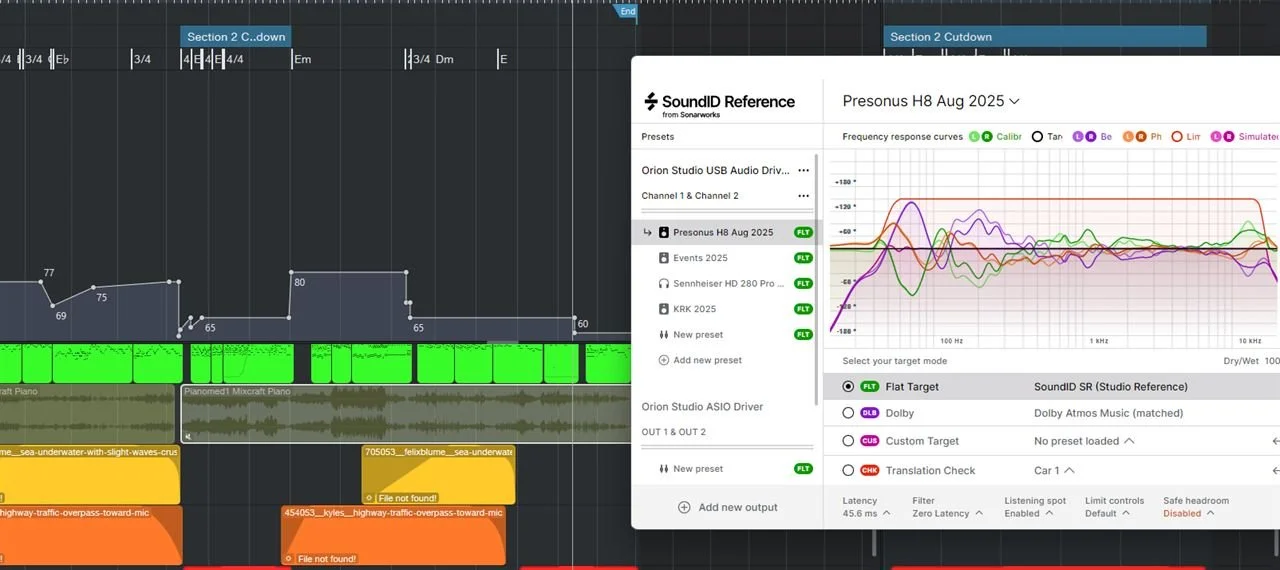
Most consumer and many studio headphones are not flat. Some have a hyped low end, some have a bright top, and some scoop the mids. If your headphones add bass, you will mix the 808 too quietly and the car exposes it as weak, or if they lack bass you will mix it too loud and the car turns it into mud. Correction software such as Sonarworks SoundID Reference can flatten many popular models so you hear closer to the truth.
There is no crossfeed
With speakers, each ear hears both speakers. With headphones, the left ear only hears the left channel and the right ear only hears the right. That makes panning and stereo effects feel wider and cleaner than they will on any speaker system. Plugins like Waves Nx simulate a speaker setup inside headphones, and Sound On Sound has a solid breakdown of mixing on headphones if you want to go deeper.
Width and reverb sound exaggerated
Because each ear is isolated, wide synths, stereo doublers, and long reverbs feel huge in headphones. On speakers, especially in a car where you sit off center, that same width can smear and pull energy away from the center where your vocal and 808 live.
Seven Reasons Your Mix Sounds Bad in the Car
Here is the short diagnosis list. Most mixes that fail in the car have at least two of these.
Too much sub-bass. The 808 or sub sits too loud below about 60 Hz, and cabin gain makes it overwhelming.
Kick and 808 fighting. Both are trying to own the same low frequencies, so neither one punches.
The vocal lacks presence. The 2 to 5 kHz area is crowded by the beat, so the vocal loses clarity under road noise.
Muddy low mids. Too much energy between about 200 and 500 Hz makes the whole record sound boxy and cloudy.
Phase or mono problems. Wide or out-of-phase low end cancels out when the car sums the signal unevenly.
Over-wide stereo elements. Width that sounds great in headphones collapses or smears on speakers.
No real-world testing. The mix was only ever checked on one pair of headphones.
“If your mix only works on one set of speakers, it is not finished yet.”
Why Vocals Disappear Behind Your 808
In hip-hop the vocal is the song. When it vanishes in the car, the fix usually lives in the upper mids and in dynamics, not just in turning the vocal up.
Clear out the presence range
Intelligibility lives roughly between 2 and 5 kHz. Hi-hats, snares, synth leads, and the top harmonics of a distorted 808 all compete there. Instead of boosting the vocal hard, try making a little room in the beat. A gentle cut in that range on the busiest instrument often does more than a big vocal boost.
Use dynamic EQ instead of static cuts
A dynamic EQ only cuts when the vocal is actually present. Tools like FabFilter Pro-Q 4 let you sidechain a band on the beat bus to the vocal, so the beat dips a couple of dB in the presence range only when the rapper is talking. The beat stays full between bars and the vocal cuts through when it matters.
Control the sibilance first
When you add presence, you also add harsh S and T sounds. Put a de-esser on the vocal before you push the top end, or the car tweeters will make it sound sharp at volume.
Add parallel compression for density
Road noise eats quiet syllables. Blending a heavily compressed copy of the vocal under the main vocal keeps the quiet words up without killing the natural punch of the delivery.
Ride the level
Compression alone will not keep every word even. Automating vocal level, especially the ends of phrases and quiet ad-libs, is the most reliable way to keep the vocal on top through the whole song.
Vocal still sitting behind the beat? Our engineers fix masking from your stems.

How to Fix Muddy Bass and Weak Kicks
Low end is where most car problems start, so treat it like its own mini mix.
Choose who leads the low end
Decide whether the 808 or the kick owns the sub. In most modern trap records, the 808 holds the sub and the kick provides the click and punch above it. Once you choose, EQ the other element to stay out of the way.
Carve with EQ
If the 808 leads, try a high-pass or low shelf cut on the kick below the 808's fundamental and emphasize the kick's attack, often somewhere in the 2 to 5 kHz click area or its body around 60 to 100 Hz depending on the sample. If the kick leads, do the opposite on the 808.
Sidechain the 808 to the kick
A fast sidechain compressor on the 808, keyed from the kick, ducks the 808 for a split second every time the kick hits. The kick punches through, then the 808 swells back. Keep the ducking short so the groove does not pump unless you want that effect.
Saturate the 808 so it reads on small speakers
Small speakers and many car door speakers cannot reproduce deep sub frequencies well. Light saturation or distortion adds harmonics higher up the spectrum, so your ear still hears the 808's note even when the speaker cannot play the fundamental. Go easy, since too much saturation fills the low mids and masks the vocal.
Tune the 808 to the key
An 808 that is out of key with the beat creates beating and clashing that sounds like mud, especially in the car where the low end is exaggerated. Make sure each 808 note matches the song's key and the chord changes.
Clean the 200 to 500 Hz range
Boxiness in this range builds up from every instrument at once, including vocals, pianos, guitars, and 808 harmonics. Sweep a narrow EQ boost to find the worst resonance, then cut it gently. Small cuts on several tracks usually sound more natural than one big cut on the master.
Watch sub-bass excess
Use a spectrum analyzer and compare your low end to a reference track in the same genre. If your sub is several dB above a commercial release, the car will make it obvious.
How Stereo Width and Phase Affect Playback
Cars, phone speakers, club systems, and many Bluetooth speakers often play something close to mono. If your mix falls apart in mono, it will fall apart there too.
Keep the low end mono
Low frequencies are hard to localize, and wide low end can cancel itself out. Many engineers keep everything below roughly 100 to 120 Hz centered. A mid/side EQ or a dedicated bass mono tool on the 808 and bass bus handles this cleanly.
Check phase correlation
A correlation meter shows how well the left and right channels agree. Readings near +1 mean the signal is mono compatible. Readings that dip toward or below zero mean parts of your mix will cancel when summed. Stereo wideners, out-of-phase layered samples, and doubled vocals are common causes.
Use width on purpose
Keep the vocal, kick, snare, and 808 strong in the center. Let pads, background vocals, and atmospheric layers carry the width. Flip your mix to mono regularly while you work, and if a key element drops in volume or changes tone, fix the width before you move on.
How to Test Your Mix on Different Speakers
Translation is proven by testing, not by guessing. Build a quick routine and run it on every mix.
Car: Play it at normal listening volume and at a louder volume. Listen for the vocal and the 808 together.
Phone speaker: Can you still hear the 808 note and every word of the hook?
Earbuds: This is how many fans will hear your song first.
Laptop speakers: A tough test for low-mid mud and harshness.
Studio monitors: Your most detailed reference for balance.
Mono: Sum the mix and check that nothing important disappears.
Take notes on each system instead of making changes in the car. Then go back to your main setup and fix the patterns that show up on several systems. If something only sounds wrong on one system, it may be that system, not your mix.
How to Use Reference Tracks Properly
A reference track is a professionally released song in the same style that you compare your mix against. Used right, it is the fastest way to stop guessing.
Level match first
Louder always sounds better to our ears. If the reference is louder than your mix, you will judge it unfairly. Turn the reference down until it matches your mix's perceived loudness before comparing. Tools like ADPTR Audio Metric AB make level-matched switching easy, and iZotope's guide to reference tracks is worth reading.
Compare one thing at a time
Switch back and forth and focus on a single question. Is my 808 louder than theirs? Is my vocal brighter or darker? Is my mix wider? Short, focused comparisons beat long casual listening.
Pick the right references
Choose two or three songs with similar tempo, 808 style, and vocal approach. A melodic trap record and a boom bap record will have very different low ends, so compare like with like. Test your references in the car too, so you learn how that car colors a finished record.
Why Loudness Is Not the Fix
A lot of artists try to fix a weak car playback by making the master louder. Streaming services make that a losing game. According to Spotify's loudness normalization documentation, Spotify adjusts tracks to a default of about -14 LUFS, so a master that is pushed much louder simply gets turned down. What remains is the extra distortion and lost punch from over-limiting. YouTube's recommended upload settings are worth checking too if you upload video versions.
A balanced mix at a sensible loudness usually sounds bigger after normalization than a crushed one. We cover this in more detail in why your song sounds quiet on Spotify after mastering.
Five Common Mixing Mistakes to Avoid
Fixing the car problem on the master. Big low-end EQ moves on the master bus change everything at once. Fix the 808, kick, and vocal in the mix first.
Mixing too loud. At high volume, our ears hear more bass and treble. Mix at a moderate level and check loud only occasionally.
Soloing too much. An 808 that sounds perfect solo may be far too big in context. Make low-end decisions with the full mix playing.
Stacking wideners. Several stereo wideners across the mix can wreck mono compatibility. Check mono every time you add width.
Sending a bad rough mix. If you work with an engineer, messy files, clipped stems, or printed effects limit what they can fix. Our stem export checklist and our DAW by DAW stem export guide help you avoid revisions.
When Mastering Can Help and When You Need a New Mix
Mastering is the final polish. It can gently balance the overall tone, set a competitive and streaming-friendly loudness, and make a group of songs feel consistent. A mastering tool or engineer can tame a little extra low end or add a touch of brightness to the whole record. Tools like iZotope Ozone are popular for this stage.
What mastering cannot do is separate elements that are fighting inside the stereo file. If the 808 masks the vocal, the kick disappears, or the low end is out of phase, the master can only move everything together. Cut the bass to save the vocal and the 808 loses weight. Boost the vocal range and the hats get harsh. Those problems need a new mix from the stems.
A simple rule is this. If the song sounds balanced but a little dull, quiet, or uneven next to other releases, mastering can help. If specific elements are fighting each other, you need a mix. If you are not sure, read our breakdown on why AI mixing is not the problem, your rough mix is.
How Blak Marigold Studio Handles Mix Translation
“Do not mix for one system. Mix for the average of all of them.”
Hear a Real Before and After
This is a real before and after hip-hop mix from our studio. Play it once on headphones and once in your car to hear what translation sounds like. You can hear more examples on our Mixing and Mastering page.
Hip-Hop Mix Example
R&B Mix Example
Pop Mix Example
If you would rather have an engineer handle all of this, that is what we do every day at our studio in Manor, just east of Austin. Our engineer has worked on records with over 1.4 billion streams, and our mixing and mastering services are built for artists who want their records to hit everywhere their fans listen.
Clear rates
Mixing and mastering: $200 per song
Mastering: $75 per song, which also covers a stereo finish
Dolby Atmos mix: $150 per song for an immersive version
Studio recording: from $50 per hour with an engineer included at our recording studio
For a wider look at what the industry charges, see our guide to professional mixing and mastering costs in 2026.
How the process works
You submit a project form for your song, then share your stems through a cloud link such as Google Drive or Dropbox in high resolution WAV or AIFF files. Most projects are delivered in 3 to 5 days, depending on song count and how clean the session is. Larger sessions can take a little longer, and we will tell you up front.
Ready for a mix that hits in the car, the club, and the phone?
Final Mix Translation Checklist
Run through this before you call any mix done.
The 808 and kick each have a clear job in the low end
Every 808 note is in key with the song
The 808 has enough harmonics to be heard on a phone speaker
The vocal is clear in the 2 to 5 kHz range without harsh sibilance
Vocal level is automated so quiet words survive road noise
The 200 to 500 Hz range is clean, not boxy
Low end below about 120 Hz is mono and the correlation meter stays positive
The mix holds up when summed to mono
You compared against level-matched reference tracks
You tested on car, phone, earbuds, laptop, and monitors
The master is not crushed just to sound loud
“A great mix does not need the perfect speaker. It works on the one your fan already owns.”
Know an artist whose mix keeps dying in the car? Send them this checklist. It might save their next release.
Frequently Asked Questions
-
Headphones and cars present bass and stereo very differently. A car's small sealed cabin boosts low frequencies, the speakers sit off center, and road noise covers quiet details. Headphones often have their own tonal coloring and no crossfeed, so they can hide too much sub-bass, a buried vocal, or wide low end. Testing on several systems reveals what headphones hide.
-
Most cars add low-end through cabin gain, so sub-bass that already sounded big in headphones can become overwhelming. Compare your 808 level to a level-matched reference track, reduce excessive energy below about 60 Hz, and make sure the 808 and kick are not stacking on the same frequencies.
-
Usually the beat is crowding the 2 to 5 kHz presence range and road noise is covering the quieter words. Make room in the beat with gentle or dynamic EQ cuts, de-ess before adding brightness, use parallel compression for density, and automate vocal level so every word stays on top.
-
In most modern trap and hip-hop, the 808 owns the sub and the kick provides the punch and click above it. Some records work the other way. What matters is choosing one leader, then using EQ and sidechain compression so the other element stays out of its way.
-
Phone and small speakers cannot reproduce deep sub frequencies well. Light saturation or distortion adds harmonics higher in the spectrum, so listeners hear the 808's note even when the fundamental is missing. Use it carefully so it does not muddy the low mids or mask the vocal.
-
It means keeping frequencies below roughly 100 to 120 Hz in the center of the stereo field. Wide or out-of-phase low end can cancel on mono and near-mono systems such as phones, cars, and Bluetooth speakers. A mid/side EQ or bass mono tool on the 808 and bass bus handles this.
-
Sum the mix to mono with your DAW or a utility plugin and listen for elements that drop in level or change tone. A correlation meter helps too. Readings close to +1 are mono friendly, while readings near zero or negative point to phase problems.
-
Only partly. Mastering can adjust the overall tone and loudness, but it cannot separate elements fighting inside the stereo file. If the 808 masks the vocal or the kick disappears, you need a new mix from the stems. A balanced mix that only sounds a little dull or quiet is a good candidate for mastering.
-
Usually not. Spotify normalizes tracks to a default of about -14 LUFS, so very loud masters get turned down and keep only the extra distortion and lost punch. A balanced mix at a sensible loudness generally sounds better after normalization.
-
Test on at least your car, a phone speaker, earbuds, laptop speakers, studio monitors, and mono. Take notes rather than making changes on each system, then fix the problems that show up on several systems.
-
Reference tracks are released songs in your style that you compare against. Level match them to your mix first, since louder always sounds better, then compare one element at a time such as 808 level, vocal brightness, or width. Choose two or three references with a similar tempo and 808 style.
-
Mixing and mastering is $200 per song, mastering alone is $75 per song, a Dolby Atmos mix is $150 per song, and studio recording starts at $50 per hour with an engineer included. Most projects are delivered in 3 to 5 days depending on song count and session condition.
Make Your Next Release Translate Everywhere
If this guide helped, share it with an artist friend whose mix keeps dying in the car, or book your session with Blak Marigold Studio today. Call us at 512-593-1267 or pick a time online.